

Headless CMS vs Traditional CMS: Which Should Your Business Choose?
TL;DR
A traditional CMS is the better choice for simple business websites, blogs, and teams that need easy content editing with a lower setup cost. A headless CMS is better for businesses that need content across multiple channels, custom frontend experiences, stronger scalability, and more developer control. A decoupled CMS is the middle option for businesses that want modern frontend flexibility while keeping a familiar CMS backend like WordPress.
Best choice by use case
| Business Need | Best CMS Choice |
|---|---|
| Simple website, blog, or brochure site | Traditional CMS |
| Low budget and fast launch | Traditional CMS |
| Non-technical content editors | Traditional CMS |
| Website plus mobile app, portal, or digital display | Headless CMS |
| Custom frontend design and performance control | Headless CMS |
| Multi-brand or enterprise content management | Headless CMS |
| Existing WordPress setup but need a modern frontend | Decoupled CMS |
Every business building a digital presence eventually runs into the same question: how should content be managed, stored, and delivered across the web? For a long time, the answer was straightforward. You picked a platform, installed it, and built your site on top of it. WordPress, Joomla, and Drupal defined an era where everything lived under one roof and worked right out of the box.
That history is exactly why the headless CMS vs traditional CMS debate is worth paying attention to, not just for technical teams, but for business owners as well. This guide gives business owners, marketers, and technical decision-makers a practical framework for thinking through the choice among traditional, headless, and decoupled CMS options.
What Is a Traditional CMS and How Does It Work
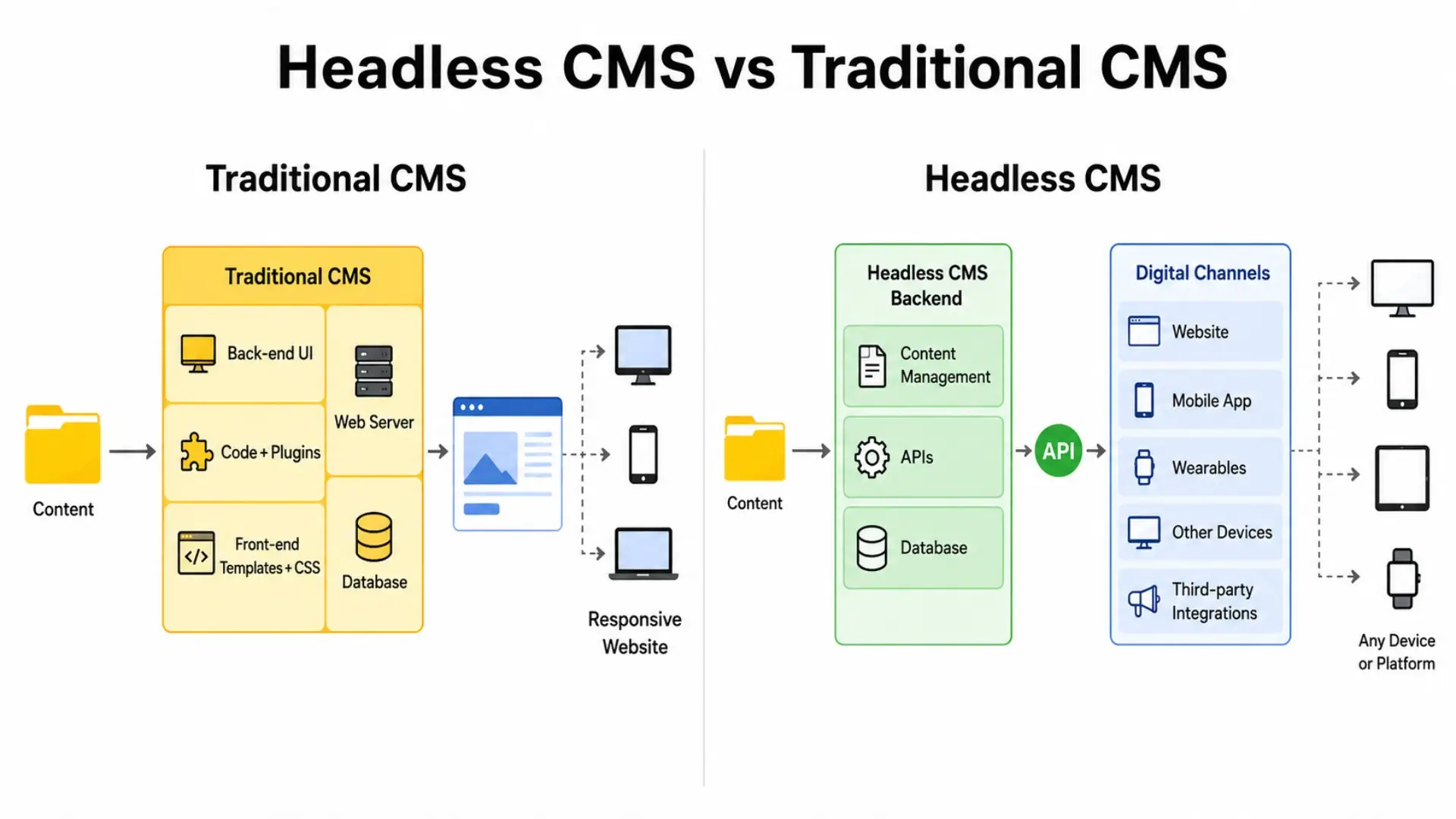
A traditional CMS is a tightly coupled system - the content management backend and frontend presentation layer are built and deployed together as one application.
When a visitor requests a page, the CMS fetches content from its database, applies its logic, and drops the output into a theme template - serving up fully rendered HTML straight to the browser. Everything lives and breathes in one place.
What a Traditional CMS Typically Includes
- A visual content editor - no coding knowledge needed
- Ready-made themes and templates so you can get a site up and running fast
- A plugin or extension ecosystem to bolt on new features as you grow
- Built-in user roles and permissions to keep editorial teams organised
- Flexible hosting options - whether you prefer managed hosting or want to run things yourself
The Most Widely Used Traditional CMS Platforms
WordPress is the most popular CMS. According to W3Techs' CMS Usage Statistics, WordPress powers approximately 41.9% of all websites worldwide as of June 2026. This underlines its affordability, plugin ecosystem, and large developer community. This pattern of a closely coupled backend-to-frontend, with varying degrees of flexibility and technical depth, holds for platforms like Joomla, Drupal, and Squarespace as well.
Who Traditionally Uses These Platforms
Traditional CMS platforms have long been the default choice for small businesses, bloggers, news publishers, and non-profits - mainly because they let you run a fully functioning website without needing a room full of developers. A big part of the appeal has always been how approachable they are. Someone with no technical background can log in and have a post live within minutes.
For a straightforward web project - nothing too complex, single output channel - this model still gets the job done for most businesses without any fuss.
What Is a Headless CMS and Why Is It Different
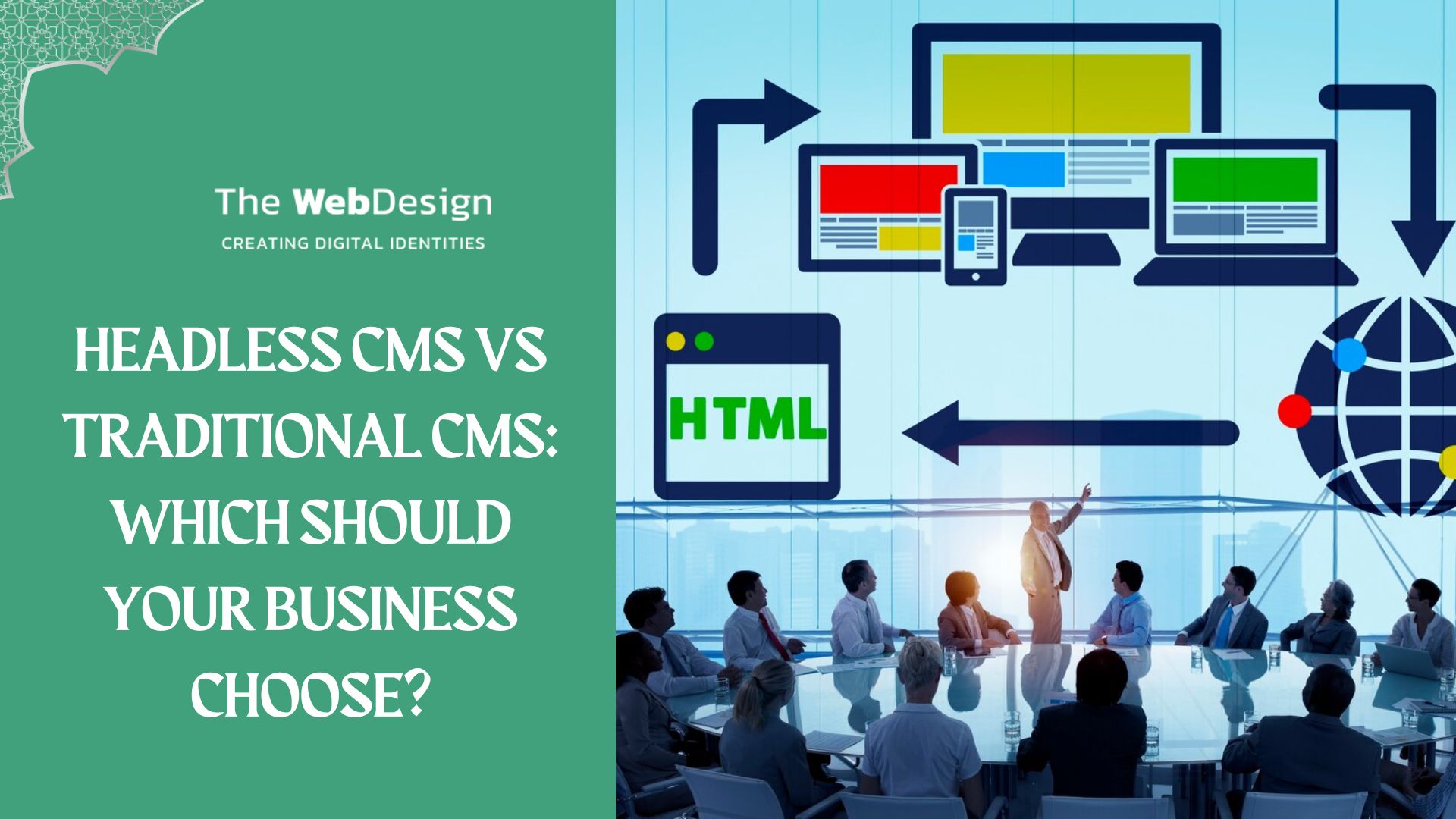
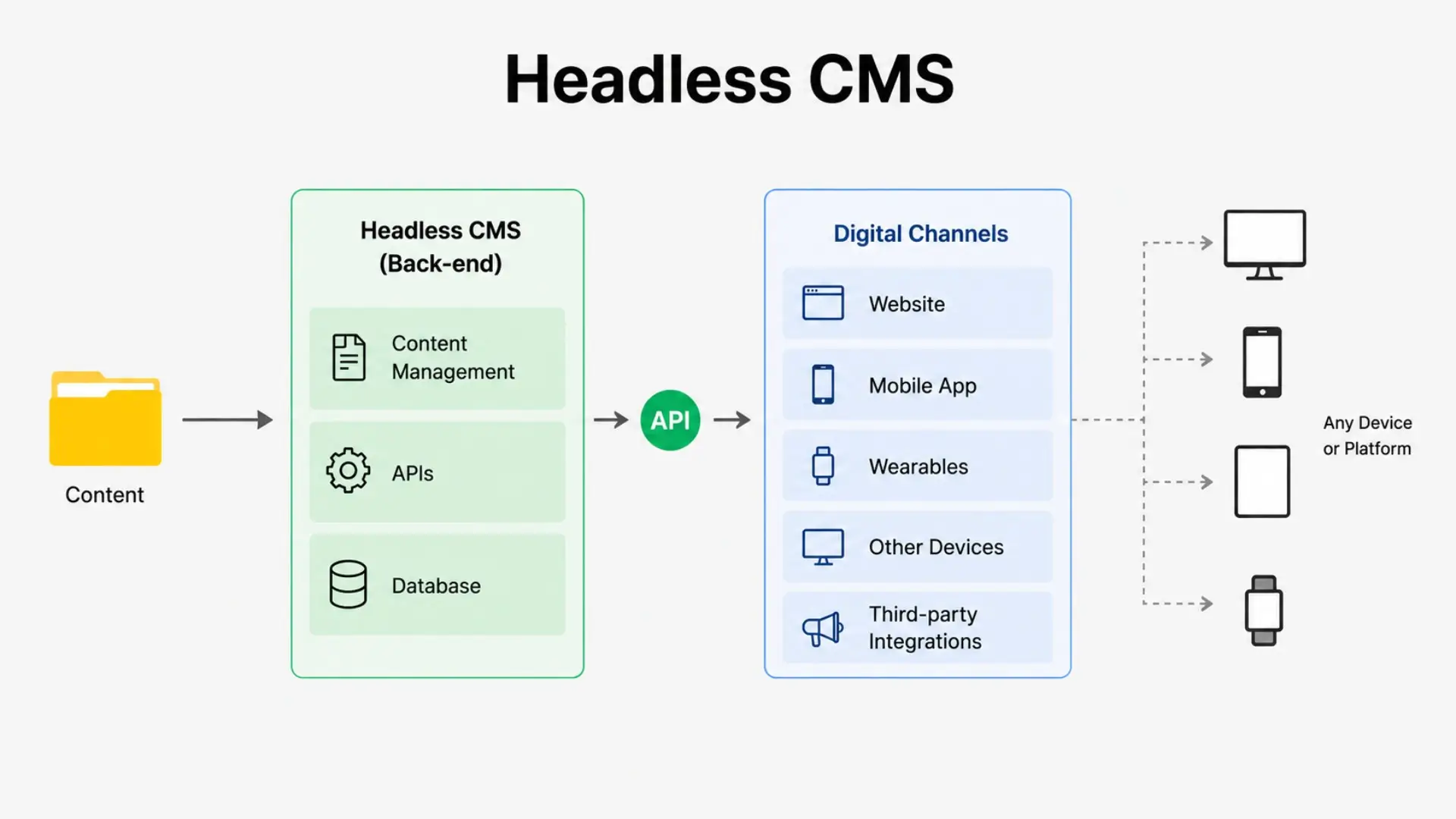
It is a CMS, which means it was built for creating, storing, and managing content - but with no frontend delivery layer. It does not generate HTML by itself. Rather, it serves content via an API (usually REST or GraphQL) that can be called and used by any frontend application.
The primary difference is that a headless CMS manages only the back-end of affairs. It is not coupled with any strongly opinionated, first-party frontend.
How Headless Architecture Works
The frontend - whether a React application, mobile app, voice interface, or digital kiosk - calls the CMS over APIs and handles rendering independently. Developers build the frontend layer using whatever framework or technology best fits the project.
Leading Headless CMS Platforms in 2026
The headless CMS market has grown significantly over the past five years. Well-established platforms include:
- Contentful - enterprise-grade content infrastructure with strong API support
- Sanity - developer-friendly with real-time collaboration and flexible content modelling
- Storyblok - a headless CMS with a visual editor that narrows the gap for non-technical editors
- Prismic - focused on marketing teams with a structured slice-based content approach
- Contentstack - enterprise-focused with strong workflow and governance features
- Strapi - open-source headless CMS with self-hosting flexibility
The Role of APIs in Headless Architecture
The API layer makes headless CMS possible for omnichannel content delivery. We can let the same content entity (for example, a blog article, paragraph description, or pricing block) be asked by a mobile app, website, and third-party integration, then render them from one location. NO duplication, no manual syncing, and no chance that your content might get out of sync across platforms.
Let’s Find the Right CMS for You
Not sure whether a traditional or headless is the best fit for your website?
Reach Out to the ExpertsHeadless CMS vs Traditional CMS: A Direct Comparison
The table below summarises the key differences across the factors that matter most when making a platform decision.
| Factor | Traditional CMS | Headless CMS | Decoupled CMS |
|---|---|---|---|
| Architecture | Tightly coupled frontend and backend | Backend-only content repository with API delivery | Separate frontend from traditional backend |
| Ease of Use | High – visual WYSIWYG editors | Moderate – form-based content editors | Moderate – depends on implementation |
| Setup Cost | Low – ready-made themes and plugins available | Higher – requires custom frontend development | Medium – some frontend development needed |
| Performance | Good with caching, but not by default | High potential when implemented well | Good – generally faster than a traditional CMS |
| Security | Requires regular plugin and core updates | Smaller attack surface due to API-first architecture | Reduced frontend exposure improves security |
| SEO | Strong – extensive plugin ecosystem such as Yoast and Rank Math | Strong – requires deliberate implementation, such as with Next.js | Strong – supports hybrid SEO strategies |
| Scalability | Limited for highly complex applications | Strong for multi-channel or high-traffic architectures | Good – more scalable than a traditional CMS |
Key Differences Explained
Choosing between a headless CMS and a traditional CMS depends largely on business requirements and long-term digital strategy.
A headless CMS is often the stronger choice when content must be delivered across multiple channels, such as websites, mobile applications, customer portals, digital displays, or future digital products. Its API-first architecture provides flexibility and supports long-term scalability, although it typically requires experienced developers to implement and maintain.
A traditional CMS remains an excellent option for organisations focused on managing a website through a single platform. It enables faster deployment, simpler content management, and lower technical complexity. For businesses without dedicated development resources, a traditional CMS often provides the most practical balance between functionality, cost, and ease of use.
Flexibility and Customisation
A headless CMS decouples front-end and back-end, letting dev teams use any front-end tech (Next.js, Nuxt, Astro, or native mobile). That means businesses can build truly custom digital experiences.
Traditional CMSs are built with fixed rules. WordPress themes follow patterns unique to WordPress, and going beyond them adds complexity and expense. In clearly scoped projects, this typically isn’t an issue, but when teams work on highly customised solutions, those built-in constraints can limit what they can do.
Ease of Use for Non-Technical Teams
Traditional CMS platforms hold a genuine advantage here. The WYSIWYG editing experience in WordPress and similar platforms allows content editors to visualise pages as they build them, without any technical knowledge.
Headless CMS platforms have refined their editorial interfaces considerably. Storyblok's visual editor, for example, now offers a preview experience comparable to a traditional CMS. However, most headless implementations use form-based structures for content editors, which takes time to get used to. This is an important consideration for organisations that expect content editors, marketing teams, or clients to update content independently without developer involvement.
Performance and Page Speed
Headless CMS architectures can support a strong page experience when paired with modern frontend frameworks, static generation, and CDN delivery. With a Jamstack approach, pages are pre-rendered at build time and served from a CDN, resulting in fast, lightweight pages with strong Core Web Vitals scores. According to Google Search Central, Core Web Vitals are among the signals Google uses to evaluate page experience, although they represent only one aspect of overall search performance.
A well-optimised traditional CMS - using caching layers, a CDN, and performance-focused plugins - can also achieve competitive page speed scores. However, this level of performance requires deliberate configuration and is not inherent to the architecture itself.
Security Considerations
Headless CMS architectures can reduce certain security risks because the content management system is separated from the public-facing frontend. This separation may decrease exposure to common attack vectors that frequently target traditional CMS installations, such as plugin vulnerabilities and administrative login pages.
However, no architecture is inherently secure by default. Headless implementations still require robust API security, authentication controls, access management, monitoring, and regular maintenance.
Traditional CMS platforms are not inherently insecure either. Their security largely depends on operational practices, including timely updates to the core platform, themes, plugins, and the hosting environment. Security should be treated as an ongoing process regardless of the architecture selected.
Scalability for Growing Businesses
Traditional CMS platforms can scale effectively when supported by appropriate hosting infrastructure, caching mechanisms, and content delivery networks (CDNs). Many high-traffic websites continue to operate successfully on traditional CMS platforms.
However, as digital ecosystems become more complex, managing content, presentation layers, integrations, and performance optimisation within a tightly coupled architecture can become increasingly challenging. For organisations operating across multiple channels or requiring extensive customisation, a headless architecture may provide greater long-term flexibility and scalability.
Cost and Time to Launch
For smaller projects, a traditional CMS is usually quicker and cheaper to launch. The abundance of themes, plugins, and experienced developers means a functional site can be delivered in days rather than weeks.
Headless CMS implementations generally require greater upfront investment because they involve architecture planning, API integration, and custom frontend development. However, they provide greater flexibility, scalability, and long-term adaptability. Businesses should evaluate whether these benefits align with their current and future requirements.
Which Types of Businesses Should Choose a Traditional CMS
A traditional CMS remains the right choice for many businesses — particularly those with clearly defined websites, limited technical teams, and no requirement to deliver content across multiple digital channels.
Small Businesses and Local Service Providers
- Easy content editing without technical expertise.
- Large plugin ecosystem for added functionality.
- Cost-effective development and maintenance.
- Suitable for service pages, contact forms, blogs, and booking systems.
- Effective for brochure websites and basic lead-generation websites.
Content-Heavy Publishing Sites
- Supports efficient editorial workflows and content management.
- Ideal for news websites, magazines, and high-volume publishers.
- Built-in compatibility with SEO tools such as Yoast SEO and Rank Math.
- Enables content teams to handle routine SEO updates without developer involvement.
- Well-suited for managing large content libraries.
Businesses With Limited Technical Resources
- Easier to manage and maintain than more complex architectures.
- Extensive documentation and community support available.
- Large pool of developers and freelancers for assistance.
- Lower long-term operational complexity.
- Reliable choice for organisations without dedicated in-house developers.
- Suitable for businesses seeking a maintainable and scalable website solution.
Which Types of Businesses Should Choose a Headless CMS
A headless CMS is often the right choice for organisations that need to distribute content across multiple digital channels, require complete control over frontend performance, or are building complex digital products where content management is only one component of a broader technology stack.
Enterprises and Multi-Brand Operations
Large organisations often benefit most from headless architecture when they need to distribute content across multiple brands, regions, products, or digital channels. A centralised content repository that feeds multiple frontends can reduce the operational complexity of maintaining a separate CMS instance for each property.
Example: A retail organisation with five regional websites and a mobile app - a headless CMS delivers product content and editorial copy consistently across all channels from a single source.
Businesses Building Multi-Channel Digital Products
If your digital presence extends beyond a website - into mobile apps, digital signage, e-commerce platforms, or connected devices - headless is the architecture designed for that reality. Reusing content across channels without manual duplication is one of the most practical advantages headless CMS offers.
Example: A fashion brand with a website, iOS app, and Android app - a headless CMS ensures product descriptions, lookbook content, and promotions are consistent across every surface.
Teams Prioritising Frontend Performance and Developer Experience
Development teams already working with modern JavaScript frameworks tend to slot into headless architecture quite naturally. The freedom to pick your own technology stack, keep a clean separation between content and presentation, and lean on static site generation or server-side rendering when the project calls for it - all of that makes headless a strong fit for web projects where performance or a fully custom interface is a hard requirement.
E-Commerce Operations With Complex Content Needs
Headless commerce - where a dedicated commerce platform handles product catalogues and transactions while a CMS takes care of editorial and marketing content - has become a well-established architectural pattern for mid-market and enterprise retailers. Platforms like Shopify, Commerce Layer, and BigCommerce can be paired with a headless CMS so that commerce data and marketing content are managed separately, giving content teams and product teams room to work without getting in each other's way.
The Hybrid Middle Ground: Decoupled CMS
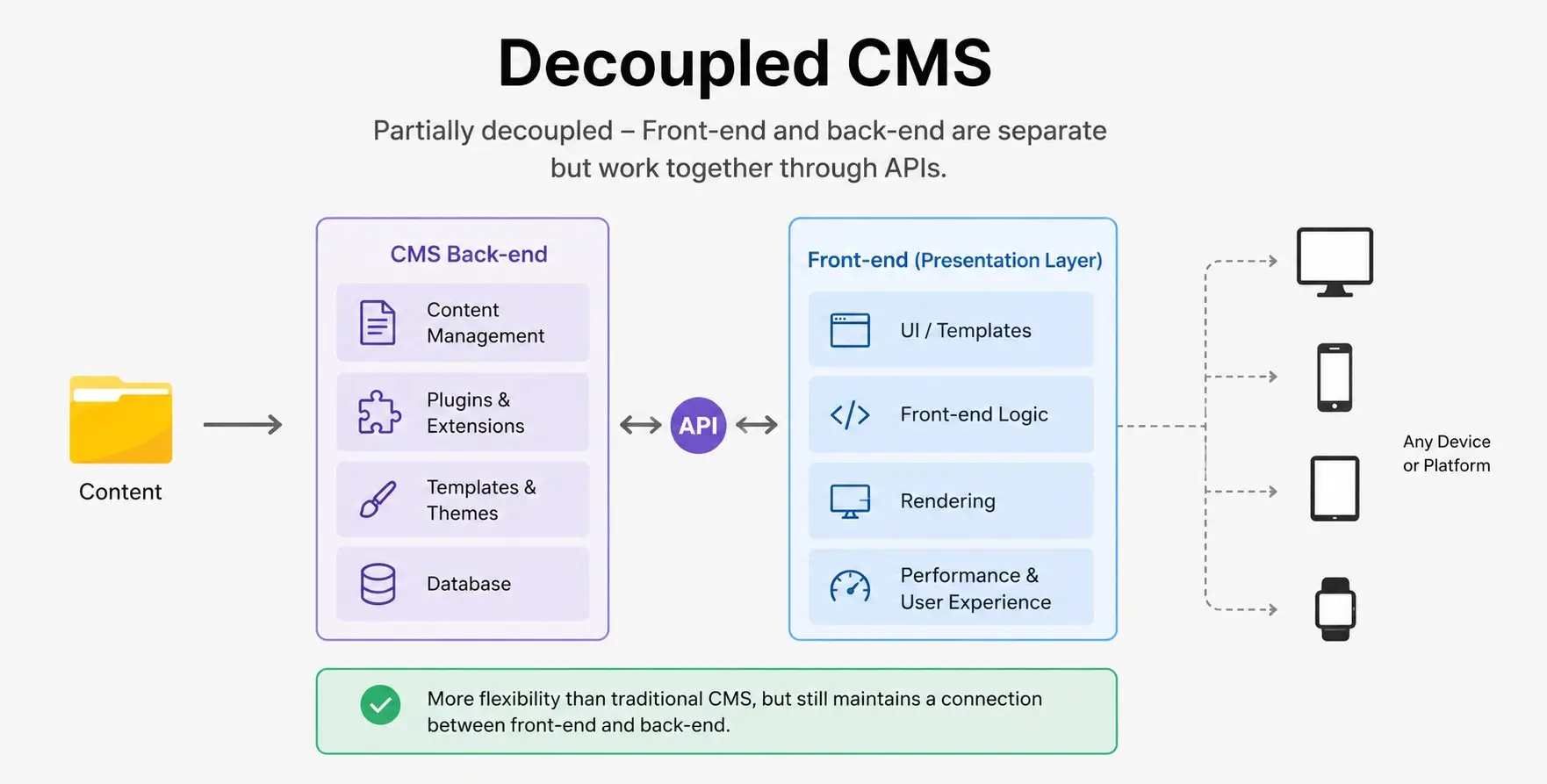
Not every decision has to be black or white. A decoupled architecture sits somewhere in between. It uses a CMS backend and a separate frontend application connected through an API — but unlike a purely headless setup, it often starts from a traditional CMS platform like WordPress.
What Decoupled Architecture Offers
A common implementation is WordPress with a React or Next.js frontend, communicating through the WordPress REST API. This approach gives teams:
- Frontend technology freedom, independent of the CMS platform
- Improved performance potential compared to traditional server-side rendering
- The editorial comfort and familiarity of an established platform like WordPress
- An API layer that can also serve other channels or integrations
When Decoupling Makes More Sense Than Going Fully Headless
If the editorial team is already accustomed to an existing CMS workflow and changing that workflow would be disruptive — but you want more frontend flexibility than a standard theme-based approach provides — decoupling is worth considering.
It also provides an incremental path for organisations with a significant investment in a traditional CMS, enabling step-by-step improvement without the full burden of platform replacement.
Example: A WordPress-based company moving to a React frontend — a decoupled CMS preserves editorial workflows while unlocking modern web development capabilities.
SEO Implications of Headless vs Traditional CMS
SEO is a critical consideration when choosing between a traditional CMS and a headless CMS. Both architectures can support strong search performance, but they approach SEO differently. Success depends less on the CMS itself and more on how the platform is configured, optimised, and maintained.
Traditional CMS SEO Strengths
Traditional CMS platforms such as WordPress are widely known for their SEO-friendly ecosystems. They offer user-friendly tools that allow content teams to manage essential SEO elements without relying on developers. This makes traditional CMS platforms particularly attractive for businesses that regularly publish content and want greater control over on-page SEO.
Key Advantages:
- Easy management of meta titles and meta descriptions.
- Built-in support through plugins such as Yoast SEO and Rank Math.
- Simple creation of XML sitemaps.
- Easy implementation of canonical tags and structured data.
- Minimal developer involvement for routine SEO updates.
- Server-rendered HTML improves basic crawlability for search engines.
Headless SEO: Powerful but More Technical
Headless CMS platforms can deliver excellent SEO performance, but most SEO features must be implemented within the frontend application. Frameworks such as Next.js provide robust support for search optimisation, including metadata management, structured data, and server-side rendering. However, these capabilities require deliberate development and technical planning.
Key Advantages:
- Full control over SEO implementation.
- Supports advanced metadata and structured data strategies.
- Excellent compatibility with modern frontend frameworks.
- Server-side rendering (SSR) and static site generation (SSG) improve search engine accessibility.
- Flexible architecture for large-scale and multi-channel websites.
Key Consideration:
- Requires developer involvement for setup and ongoing optimisation.
Core Web Vitals and Search Visibility
Website performance plays an important role in modern SEO. Headless architectures often use technologies such as Static Site Generation (SSG) and Incremental Static Regeneration (ISR), which can help deliver fast-loading pages and strong Core Web Vitals scores. While Google uses Core Web Vitals as part of its ranking systems, they represent only one component of overall page experience.
Fast, structured, and well-organised websites can improve user experience and support broader visibility across traditional search results and emerging AI-assisted search experiences.
Performance Benefits of Headless Architectures:
- Faster page loading speeds.
- Improved Core Web Vitals potential.
- Better scalability for high-traffic websites.
- Enhanced user experience across devices.
- Strong foundation for long-term SEO growth.
Making the Decision: A Practical Framework
Use these five questions to guide your platform decision.
Step 1: Define Your Content Channels
Does your content need to reach more than one surface — website plus mobile app, or website plus digital signage? If yes, headless architecture is worth serious consideration from the start.
Step 2: Assess Your Team's Technical Capability
Be honest about who will build and maintain the system. A headless implementation without the in-house capability to support it creates long-term dependency on external developers. That is not always a problem, but it should be a deliberate, informed choice.
Step 3: Evaluate Your Editorial Team's Needs
How much technical comfort do your content editors have? How important is real-time visual preview to their day-to-day workflow? These questions should carry as much weight as the technical architecture considerations.
Step 4: Consider Your Growth Trajectory
If you are planning to launch a mobile app, expand into new markets, or build an increasingly complex digital product over the next two years, plan for that roadmap now rather than face a re-platform later. A business with a stable, well-defined scope can choose without buying complexity that it does not yet need.
Step 5: Work With a CMS Implementation Partner With Experience in Both
A capable development team will have worked with both architectures and can advise on which suits your needs, without a bias toward one approach. Request case studies and specific results from both types of projects.
Frequently Asked Questions
No. WordPress remains one of the most popular and easiest-to-use website platforms on the market. A headless CMS becomes more relevant when a business needs multi-channel content delivery, greater frontend control, or enterprise-level content operations. For smaller, well-scoped websites, headless architecture may introduce unnecessary complexity rather than provide a clear business advantage.
Summary
The comparison between headless CMS and traditional CMS does not have a single correct answer. Both architectures are mature, actively developed, and used by businesses building serious digital products in 2026. The right choice depends on a specific combination of factors: your content channels, your team's technical capability, your editorial workflow requirements, your budget, and your growth ambitions.
What is clear is that the web has become more complex, and content management tools have evolved in response. Understanding the structural differences between these two approaches - and being honest about which one fits your actual situation - is what leads to better decisions and more durable digital products.

Search
Categories
Recent Posts
- 20 Dec, 2024 Building Brand Loyalty: How Custom Mobile Apps Drive Business Success
- 17 Jan, 2025 Designing An Attractive and Truly User-Friendly Website!
- 23 Dec, 2024 Driving Sales Through Online Channels: Transforming Your Business with a Webshop
- 09 Sep, 2024 Enhancing Customer Engagement: The Business Benefits of Mobile App Development
- 23 Dec, 2024 Expanding Market Reach: The Strategic Value of an E-commerce Webshop
- 10 Mar, 2026 Google Review Card: NFC vs QR – What Works Better?
- 01 May, 2026 Google Tools for Websites: A Complete, Detailed Guide for Website Owners, Developers, and Marketers
- 09 Sep, 2024 Harnessing Professional Web Design: Elevating Your Business’s Online Presence
- 13 Jun, 2026 Headless CMS vs Traditional CMS: Which Should Your Business Choose?
- 09 Sep, 2024 How an Online Delivery System Empowers Business Operations
- 07 Aug, 2026 How can a Dutch company get cited in ChatGPT, Gemini, Perplexity, and Copilot answers?
- 18 Sep, 2026 How can I choose a reliable web development company in the Netherlands?
- 07 Sep, 2026 How do I improve local visibility in ChatGPT and Microsoft Copilot, not just Google Maps?
- 20 Jan, 2025 How To Build A Custom Website For Your Business?
- 31 Aug, 2026 How to Choose a Digital Marketing Agency in the Netherlands: Services, Costs and a Practical Checklist
- 20 Jan, 2025 How To Create A Professional Website For Building Online Presence?
- 02 Aug, 2024 How to Plan a Perfect Digital Market
- 25 Jun, 2026 How to Work With a Web Design Agency to Grow Your Online Presence?
- 23 Dec, 2024 Investing in Website Development: Enhancing Customer Engagement and Conversion Rates
- 23 Dec, 2024 Meeting Customer Expectations: The Competitive Edge of an Online Delivery System
- 23 Dec, 2024 Optimizing Logistics: Enhancing Business Agility with an Online Delivery System
- 17 Jan, 2025 Optimizing Your Website with a Website Builder in Amsterdam
- 20 Jul, 2026 Progressive Web Apps (PWA) vs Native Apps
- 22 Apr, 2026 SEO vs GEO: The Future of Search in the Age of AI
- 03 Apr, 2026 The 10 Biggest Mistakes When Building a Website – and How to Avoid Them
- 27 Dec, 2025 The Cost of Getting a Website Made: What You Can Expect in the Netherlands?
- 09 Sep, 2024 The Essential Role of Online Marketing for Businesses
- 20 Dec, 2024 The Power of Digital Storytelling: Leveraging Online Marketing to Connect with Customers
- 23 Dec, 2024 The Strategic Advantage of a Well-Designed Website for Business Growth
- 23 Dec, 2024 Unlocking Market Potential: How Strategic Digital Marketing Propels Business Success
- 09 Sep, 2024 Unlocking Revenue Streams: Establishing an Online Webshop for Your Business
- 06 Jul, 2026 Web Performance Optimisation: Core Web Vitals
- 22 Oct, 2026 What Happens After Your Website Goes Live? A Guide to Aftercare and Support
- 03 Aug, 2026 What is an E-commerce Website and How Does It Work?
- 27 Mar, 2026 What is sitemap.xml and Why Is It Important for SEO?
- 15 Apr, 2026 What Is the Difference Between Shopify and WordPress?
- 15 Jan, 2026 What Makes a Website Design User-Friendly?
- 30 Jul, 2026 What’s Allowed/Not Allowed With Google Reviews?
- 21 Mar, 2026 What’s Involved in Having a Website Created: A Step – by – Step Guide
- 27 Feb, 2026 What’s Involved in Having a Website Created: A Step-by-Step Guide
- 21 Jan, 2025 Why Consider WordPress for Website Builder?
- 21 Jan, 2025 Why Do Businesses Hire WordPress Website Builder Companies?
- 20 Jan, 2025 Why Does Your Business Need a Local Web Design Agency?
- 12 Aug, 2026 Why Is My WordPress Website Slow and How Can I Fix It?
- 11 Dec, 2025 Why You Should Have a Professional Website Built in 2026: What’s Changing?