


Web Performance Optimisation: Core Web Vitals
TL;DR
Core Web Vitals are Google’s key page experience metrics for measuring how fast, responsive, and visually stable a website feels to real users. The three main metrics are Largest Contentful Paint (LCP), Interaction to Next Paint (INP), and Cumulative Layout Shift (CLS).
A good Core Web Vitals score does not guarantee higher rankings on its own, because content quality and relevance remain more important. However, strong performance can improve user experience, reduce friction, support conversions, and help your website stay competitive when similar pages are competing in search results.
| Core Web Vitals | What It Measures | Good Score | Common Problems | Best First Fix |
|---|---|---|---|---|
| Largest Contentful Paint (LCP) | How quickly the main visible content loads | 2.5 seconds or less | Large images, slow server response, render-blocking CSS or JavaScript | Optimise and preload the main image, improve hosting/CDN, and reduce render-blocking resources |
| Interaction to Next Paint (INP) | How quickly the page responds to user interactions | 200 milliseconds or less | Heavy JavaScript, long tasks, third-party scripts, and large bundles | Break up long JavaScript tasks, defer non-critical scripts, and reduce bundle size |
| Cumulative Layout Shift (CLS) | How stable the page layout is while loading | 0.1 or less | Images without dimensions, late-loading ads, banners, fonts, and widgets | Reserve space for dynamic content and define image and video dimensions |
Quick Comparison: Lab Data vs Field Data
| Data Type | What It Shows | Best Used For | SEO Relevance |
|---|---|---|---|
| Lab Data | Simulated performance in a controlled test environment | Debugging issues before or during development | Useful for optimisation, but not the main real-world benchmark |
| Field Data | Real performance from actual users, devices, and networks | Measuring true user experience over time | More important for Core Web Vitals reporting and page experience evaluation |
How Do You Improve Core Web Vitals?
Start with your most important pages, especially the homepage, landing pages, product/service pages, and high-traffic blog posts. Test them in PageSpeed Insights, identify whether LCP, INP, or CLS is the biggest issue, then fix the highest-impact problems first.
In most cases, the fastest improvements come from optimising images, improving server response time, reducing render-blocking resources, cutting unnecessary JavaScript, delaying third-party scripts, and preventing layout shifts caused by images, ads, fonts, or dynamic content.
Website speed has become a critical factor in both user experience and search visibility. According to Google's Web Vitals and Page Experience documentation, website performance can influence how users interact with content, particularly on mobile devices. As a result, speed, stability, and responsiveness are no longer optional - they are essential components of a successful website.
Reference: Google Search Central – Core Web Vitals and Search
https://developers.google.com/search/docs/appearance/core-web-vitals
Core Web Vitals are Google's standardised framework for measuring real-world user experience across loading performance, responsiveness, and visual stability. This guide explains what Core Web Vitals are, why they matter, how they impact SEO and user experience, and the practical actions business leaders and development teams can take to improve them.
What Are Core Web Vitals and Why Do They Matter?
Core Web Vitals are a set of user-centric performance metrics developed by Google to measure real-world website experience. They focus on loading speed, interactivity, and visual stability, helping website owners understand how users experience a page beyond traditional technical metrics.
These metrics are part of Google's broader page experience considerations. According to Google documentation, Core Web Vitals help measure whether a page provides a good user experience and may serve as a supporting signal when multiple pages offer similar content quality and relevance.
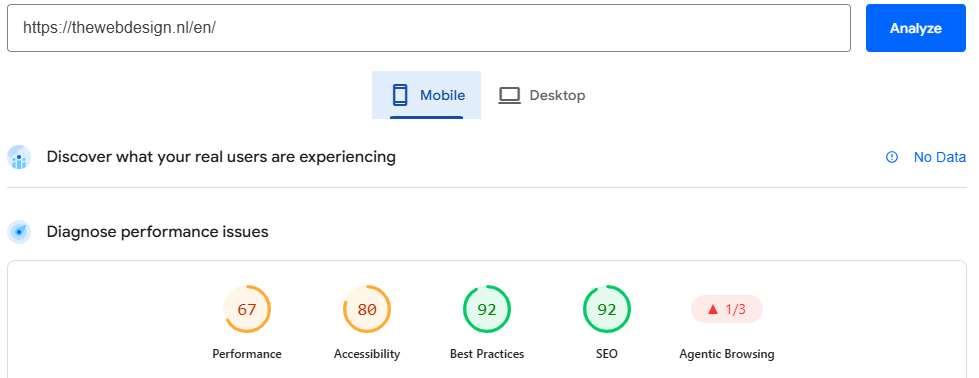
Quality and relevance remain the primary ranking factors. Core Web Vitals should therefore be understood as supporting signals that can matter in competitive search environments, not as a standalone route to higher rankings. That said, consistently poor performance may create a measurable disadvantage when competing pages are otherwise similar, and tools like Google PageSpeed Insights make it easier to identify and address performance issues early.
Reference: Google PageSpeed Insights
The Three Core Metrics You Need to Know
Core Web Vitals focus on three measurable areas of user experience: loading performance, responsiveness, and visual stability. Each metric has defined thresholds that help website owners understand whether a page provides a good, needs improvement, or poor experience.
Largest Contentful Paint (LCP)
LCP measures how long it takes for the largest visible content element on a page to load. This is often a hero image, banner, main heading, or large content block.
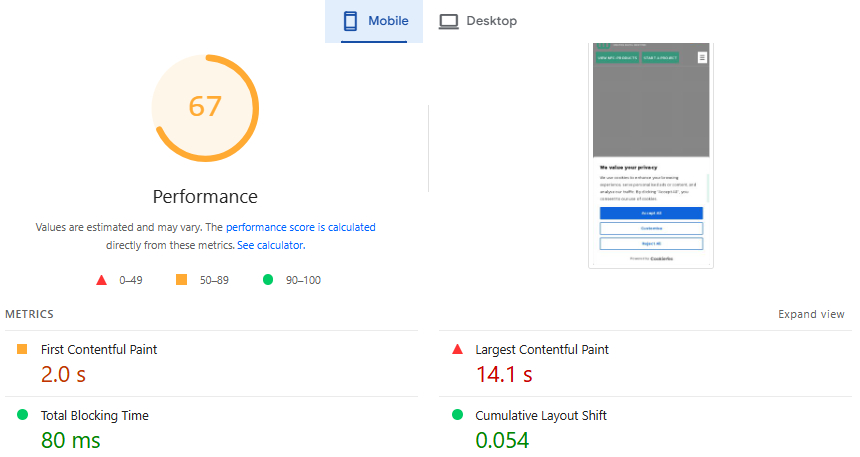
A good LCP score is 2.5 seconds or less. A score between 2.5 and 4 seconds needs improvement. Anything above 4 seconds is considered poor.
LCP matters because it reflects how quickly users can access the main content of a page. When the largest visible element loads slowly, visitors may perceive the website as unreliable or unresponsive. This can increase bounce rates, reduce engagement, and negatively affect conversions. Faster loading times generally improve both user satisfaction and overall website performance.
Common LCP issues include unoptimised images, render-blocking CSS or JavaScript, slow server response times, and poor caching configuration.
Key actions to improve LCP:
- Convert images to next-generation formats such as WebP or AVIF
- Implement lazy loading for off-screen images only — never lazy-load the LCP image itself
- Use a Content Delivery Network (CDN) to reduce server response times
- Preload the LCP image using a hint in the document head
- Eliminate render-blocking CSS and JavaScript that appears above the fold
Interaction to Next Paint (INP)
First Input Delay (FID) was replaced by Interaction to Next Paint (INP) in March 2024 because FID measured only the first user interaction. INP provides a more comprehensive assessment by evaluating responsiveness throughout the entire user session.
Reference: web.dev – Interaction to Next Paint
https://web.dev/articles/inp
Reference: web.dev – INP became a Core Web Vitals
https://web.dev/blog/inp-cwv-march-12
High INP values can make a page feel slow or unresponsive, especially when users click buttons, open menus, fill out forms, or interact with dynamic elements. Poor responsiveness may reduce engagement and increase abandonment rates.
According to Google's web.dev documentation, an INP below 200 milliseconds is good. Between 200 and 500 milliseconds needs improvement. Above 500 milliseconds is poor.
Key actions to improve INP:
- Break up long JavaScript tasks using the JavaScript Scheduler API or setTimeout chunking
- Defer non-critical scripts until after the page becomes interactive
- Reduce overall JavaScript bundle size through code splitting and tree shaking
- Use React Server Components or partial hydration in modern frameworks where appropriate
- Audit and remove or delay heavy third-party scripts
Cumulative Layout Shift (CLS)
CLS measures visual stability. It tracks how much visible content unexpectedly moves while a page is loading or being used.
Unexpected layout shifts can frustrate users, especially when they are reading content, clicking a button, or filling out a form. A page may load quickly, but if text, images, buttons, or banners move after rendering, the experience can still feel unstable.
Common causes of layout shift include:
- Images or video embeds with no explicit width and height dimensions
- Ads or banners are injected into the page after the initial render
- Web fonts that cause text reflow when they finish loading
- Third-party widgets that load asynchronously and displace existing content
Key actions to improve CLS:
- Always add width and height attributes to images and videos
- Reserve space for advertisements, banners, and dynamic content before they load
- Use CSS aspect-ratio properties or predefined container dimensions to minimise layout movement
- Use font-display: optional where appropriate, or font-display: swap with adjusted fallback font sizing
- Avoid injecting banners, popups, or interface elements above existing content after the page has rendered
- Use the Chrome DevTools Performance tab to identify the elements causing layout shifts
How Google Measures Core Web Vitals
Google evaluates Core Web Vitals using a combination of real-user field data and controlled lab data. For Core Web Vitals reporting and SEO-related evaluation, field data is especially important because it reflects real user experiences.
Lab Data vs Field Data
Understanding the difference between these two data types is essential before concluding any speed testing tool.
| Factor | Lab Data | Field Data |
|---|---|---|
| Definition | Performance data generated through simulated testing in a controlled environment. | Performance data collected from real users visiting your website. |
| Data Source | Tools such as Lighthouse and PageSpeed Insights. | Chrome User Experience Report (CrUX) and Google Search Console. |
| Testing Environment | Controlled network, CPU, and device conditions. | Real-world devices, networks, locations, and user behaviours. |
| Consistency | Highly consistent and repeatable across tests. | Varies based on actual user experiences and traffic patterns. |
| Primary Use | Development, debugging, and identifying performance issues. | Measuring real-world performance and user experience. |
| SEO Impact | Helps identify optimisation opportunities but does not directly represent ranking performance. | Used by Google to evaluate Core Web Vitals and page experience signals. |
| Speed of Feedback | Immediate results after each test. | Data is collected over time and may take days or weeks to update. |
| Accuracy for Real Users | Limited, as it relies on simulated conditions. | High, as it reflects genuine user experiences. |
| Best For | Developers optimising pages before deployment. | Assessing how actual visitors experience website performance. |
| Priority Level | Useful diagnostic tool. | Higher priority because it reflects real-world performance and influences Core Web Vitals reporting. |
Lab data helps identify and troubleshoot performance issues during development, while field data reveals how real users experience your website. For SEO and Core Web Vitals performance, field data should be the primary benchmark.
The Best Tools for Measuring Performance
Performance measurement tools help identify technical bottlenecks, monitor Core Web Vitals, and track real-user experience over time. They provide actionable insights that help development teams prioritise improvements, validate changes, and detect regressions before they affect users.
Google PageSpeed Insights
Google PageSpeed Insights is the most widely used starting point. Enter any URL, and it returns both Lighthouse lab scores and CrUX field data, broken down by mobile and desktop. It gives a clear picture of where your page sits against the good, needs-improvement, and poor thresholds.
Official link:
Google Search Console
Google Search Console provides aggregate Core Web Vitals data for your entire site, grouped by URL pattern. It identifies which pages are failing and shows a historical view of performance trends, which is useful for detecting regressions after deployments.
Official link:
https://support.google.com/webmasters/answer/9205520
Lighthouse in Chrome DevTools
Lighthouse in Chrome DevTools lets you audit individual pages directly in your browser. It covers performance, accessibility, best practices, and SEO in a single report. Use it during development to catch issues before they reach production.
Official link:
https://developer.chrome.com/docs/lighthouse/
WebPageTest
WebPageTest is a more advanced tool that supports multi-step testing, geographic location selection, and detailed waterfall charts. It is particularly useful for debugging complex performance issues that simpler tools may not surface.
Official link:
CrUX Dashboard
The CrUX Dashboard is a Looker Studio-based visualisation of real-user performance data over time for your origin. Initial setup takes around 15 minutes and gives you a rolling view of how real users are experiencing your site week to week.
Official link:
https://developer.chrome.com/docs/crux/dashboard/
Calibre and SpeedCurve
Calibre and SpeedCurve are continuous monitoring platforms that help catch performance regressions before they affect users in production. Both can support performance monitoring workflows and alert teams when a deployment causes a measurable drop in performance scores.
Official links:
How to Fix Core Web Vitals: Practical Optimisation Strategies
Improving Core Web Vitals requires a combination of infrastructure optimisation, efficient resource delivery, image optimisation, and frontend performance improvements. The goal is to create a faster, more stable, and more responsive experience for users while supporting broader SEO objectives.
Server-Side Performance and Infrastructure
Server performance forms the foundation of overall website speed. Time to First Byte (TTFB) measures how quickly a server responds to an initial request. High TTFB values can negatively affect loading performance and contribute to poor LCP scores, making infrastructure optimisation an important part of any performance strategy.
Improving TTFB involves:
- Choosing a high-performance hosting provider with low server latency
- Using server-side caching with tools like Redis or Varnish
- Enabling HTTP/2 or HTTP/3 for multiplexed connections
- Deploying through a CDN with edge locations close to your users
- Configuring Nginx or Apache with appropriate caching headers

Image Optimisation
According to the HTTP Archive Web Almanac, modern image formats such as WebP and AVIF can significantly reduce file sizes compared with traditional JPEG and PNG formats while maintaining comparable visual quality. The exact reduction varies by image type and compression settings, but smaller files generally contribute to faster loading times and improved Core Web Vitals performance.
Reference: HTTP Archive Web Almanac
https://httparchive.org/reports
Format
Use WebP or AVIF across your site where supported. Both can produce smaller file sizes at comparable or better visual quality than JPEG and PNG. Most modern image CDNs can automatically serve the correct format based on the browser's Accept header.
Responsive Images
Use the srcset attribute to serve appropriately sized images at different breakpoints. Serving a 1,400-pixel image displayed at 400 pixels on mobile wastes bandwidth and adds unnecessary render delay.
LCP Image
Never lazy-load the LCP element. Preload it using a tag in the document head and ensure it is served from a fast, cached origin. This single change can often deliver a significant LCP improvement on image-heavy pages.
JavaScript and CSS Optimisation
Large JavaScript payloads are one of the most common causes of poor INP and delayed interactivity.
Code Splitting
Split your JavaScript bundle into smaller chunks that load only when needed. This is supported natively by modern bundlers such as Vite, Webpack, and Rollup. Pair code splitting with dynamic imports to delay loading of heavy components until they are actually needed.
Unused Code Removal
Use tools such as PurgeCSS to identify and remove CSS that is never applied. The Coverage tab in Chrome DevTools shows unused JavaScript and CSS across any given page.
Script Loading
Move non-critical scripts to the bottom of the document, or use async and defer attributes to avoid blocking the parser. Inline critical above-the-fold CSS in the document head and load the remaining stylesheet asynchronously. This allows the browser to begin rendering before larger stylesheets have been parsed, which can directly improve LCP.
Third-Party Scripts
Analytics tools, chat widgets, ad networks, and social embeds require particular scrutiny. Load non-essential third-party scripts after the page becomes interactive, using a facade pattern or delayed-loading strategy to protect both INP and overall page speed.
Core Web Vitals for Mobile-First Indexing
Mobile-first indexing means that Google predominantly uses the mobile version of a page for indexing and ranking, including for users searching on desktop.
Reference: Google Search Central – Mobile-first indexing best practices
Mobile performance is inherently harder to optimise for. Mobile devices typically have less processing power and memory than desktop machines, and mobile network connections can be slower and less stable than fixed broadband. This means a page that performs well on desktop can still create a poor experience on the mid-range Android devices that account for a significant share of real-world traffic.
Using Google PageSpeed Insights to test mobile performance specifically is one of the most reliable ways to surface these device-level issues.
Mobile optimisation best practices:
- Keep JavaScript execution lean and avoid long tasks that block the main thread
- Avoid heavy animations that place excessive load on mobile GPUs
- Use system fonts where appropriate to reduce font loading latency
- Test regularly on real mid-range Android devices, not just high-end flagship phones
- Apply responsive design with performance budgets specific to mobile breakpoints
- Minimise or remove large background videos on mobile viewports
Core Web Vitals, E-E-A-T, and AI Search in 2026
Performance and content quality should be viewed as complementary factors. High-quality content may struggle to engage users if pages load slowly, shift unexpectedly, or respond poorly to interactions. Strong performance helps ensure that users can access and engage with information efficiently, allowing expertise, authority, and trustworthiness to be communicated effectively.
Performance and Perceived Trust
Google's E-E-A-T framework — Experience, Expertise, Authoritativeness, and Trustworthiness — is primarily concerned with the quality, accuracy, and credibility of your content. It is not a direct technical ranking signal, and strong Core Web Vitals scores alone do not satisfy E-E-A-T requirements.
However, performance still influences how users perceive and engage with that content. If a page loads slowly, shifts unexpectedly, or responds poorly to user actions, visitors may leave before they have a chance to evaluate the quality of the information. In that sense, performance supports the delivery of expertise rather than replacing the need for expertise.
Fast, stable pages make it easier for users to read, trust, and act on your content. When competing pages cover similar topics with similar quality, a smoother user experience can help improve engagement and reduce friction.
That said, no amount of technical performance will compensate for thin content, unsupported claims, or poor author credibility. E-E-A-T still requires first-hand expertise, reliable sourcing, accurate information, and a clear editorial purpose.
Generative Engine Optimisation (GEO) and Speed
Generative Engine Optimisation (GEO) combines content quality, technical performance, and structured information to improve visibility across AI-powered search experiences and traditional search engines.
GEO focuses on improving visibility in AI-powered search experiences such as Google AI Overviews and Microsoft Copilot. While the field is still developing, several practical principles are clear:
- AI systems often favour content that includes credible citations, statistics, expert quotes, and clearly defined concepts
- Well-structured content with logical heading hierarchies is easier for AI systems to understand and extract
- Fast-loading pages improve user experience and may support efficient crawling by search engines and AI systems
- Clean HTML structure and structured data markup help search engines interpret content more accurately
- FAQ sections and direct answers to common questions can improve content accessibility for AI-driven search results
- Strong E-E-A-T signals remain important for visibility
- There is currently no definitive evidence that page speed directly influences AI crawler prioritisation
- Fast, organised, and credibly sourced content aligns with the quality expectations of modern search ecosystems
Combining Core Web Vitals optimisation, structured data, clear content architecture, and source attribution is a practical strategy for improving both SEO and GEO performance.
A Step-by-Step Performance Improvement Roadmap
A systematic approach is the most efficient way to improve website performance. A clear framework helps teams identify issues, prioritise fixes, measure progress, and continuously optimise Core Web Vitals, user experience, search visibility, and site reliability.
Step 1 - Audit Your Current State
Run PageSpeed Insights across your most important pages: homepage, top landing pages, and highest-traffic content. Record LCP, INP, and CLS scores separately for mobile and desktop. Note which URLs fall into the poor or needs-improvement band for each metric.
Group results by page template. Product pages, blog posts, service pages, and landing pages often share common causes.
Step 2 - Prioritise by Impact
Begin by identifying the metric with the largest performance gap. For many websites, LCP is often the primary bottleneck, although this varies by implementation.
Prioritise improvements on high-traffic and business-critical pages first, as these typically provide the greatest impact on user experience and commercial outcomes.
Step 3 - Implement and Validate in the Lab
Address the highest-priority causes first: server response time, image format and sizing, render-blocking resources, JavaScript bundle size, and layout shift contributors.
After each change, validate the fix using Lighthouse or WebPageTest before deploying to production.
Step 4 - Monitor Field Data
Wait at least four to six weeks after deploying improvements before concluding field data in Google Search Console. CrUX data is aggregated over a rolling 28-day window, so changes take time to appear in reported scores.
Step 5 - Iterate Continuously
Repeat the audit cycle after every major deployment. Configure Lighthouse CI or a monitoring platform such as Calibre or SpeedCurve to detect regressions automatically.
Performance is not a one-time project. It is an ongoing maintenance practice with compounding returns over time.
Frequently Asked Questions
Core Web Vitals are three metrics used by Google to measure loading speed, interactivity, and visual stability. These metrics are LCP, INP, and CLS. They are part of Google's page experience considerations and can help differentiate pages in competitive search results when content quality and relevance are otherwise similar. However, content relevance and quality remain the most important ranking factors.
Need Help Improving Your Core Web Vitals?
If your website is struggling with slow loading times, poor mobile performance, layout shifts, or low PageSpeed Insights scores, The WebDesign can help you identify and fix the issues that matter most.
A Core Web Vitals audit from The WebDesign can include:
- PageSpeed Insights and Lighthouse review for key pages
- Mobile and desktop performance comparison
- LCP, INP, CLS, and TTFB issue diagnosis
- Image, JavaScript, CSS, caching, and hosting recommendations
- Priority-based performance roadmap for developers
- Technical SEO checks connected to performance and page experience
- Post-implementation validation to confirm measurable improvements
For businesses that rely on organic traffic, lead generation, or conversion-focused landing pages, improving Core Web Vitals is not just a technical task. It supports better user experience, stronger engagement, and more reliable search performance.
Visit:
Summary
Web performance is ultimately about delivering a fast, stable, and responsive experience for real users. Core Web Vitals provide a clear framework for measuring website quality through loading speed, responsiveness, and visual stability.
The most effective approach is to regularly monitor performance, prioritise field data, address the largest issues first, and treat optimisation as an ongoing process rather than a one-time task.
Strong Core Web Vitals can improve user satisfaction, reduce bounce rates, and support long-term search visibility. By combining performance optimisation with high-quality content and technical best practices, businesses can build websites that remain competitive, scalable, and effective in both traditional and AI-driven search environments.

Search
Categories
Recent Posts
- 20 Dec, 2024 Building Brand Loyalty: How Custom Mobile Apps Drive Business Success
- 17 Jan, 2025 Designing An Attractive and Truly User-Friendly Website!
- 23 Dec, 2024 Driving Sales Through Online Channels: Transforming Your Business with a Webshop
- 09 Sep, 2024 Enhancing Customer Engagement: The Business Benefits of Mobile App Development
- 23 Dec, 2024 Expanding Market Reach: The Strategic Value of an E-commerce Webshop
- 10 Mar, 2026 Google Review Card: NFC vs QR – What Works Better?
- 01 May, 2026 Google Tools for Websites: A Complete, Detailed Guide for Website Owners, Developers, and Marketers
- 09 Sep, 2024 Harnessing Professional Web Design: Elevating Your Business’s Online Presence
- 13 Jun, 2026 Headless CMS vs Traditional CMS: Which Should Your Business Choose?
- 09 Sep, 2024 How an Online Delivery System Empowers Business Operations
- 07 Aug, 2026 How can a Dutch company get cited in ChatGPT, Gemini, Perplexity, and Copilot answers?
- 18 Sep, 2026 How can I choose a reliable web development company in the Netherlands?
- 07 Sep, 2026 How do I improve local visibility in ChatGPT and Microsoft Copilot, not just Google Maps?
- 20 Jan, 2025 How To Build A Custom Website For Your Business?
- 31 Aug, 2026 How to Choose a Digital Marketing Agency in the Netherlands: Services, Costs and a Practical Checklist
- 20 Jan, 2025 How To Create A Professional Website For Building Online Presence?
- 02 Aug, 2024 How to Plan a Perfect Digital Market
- 25 Jun, 2026 How to Work With a Web Design Agency to Grow Your Online Presence?
- 23 Dec, 2024 Investing in Website Development: Enhancing Customer Engagement and Conversion Rates
- 23 Dec, 2024 Meeting Customer Expectations: The Competitive Edge of an Online Delivery System
- 23 Dec, 2024 Optimizing Logistics: Enhancing Business Agility with an Online Delivery System
- 17 Jan, 2025 Optimizing Your Website with a Website Builder in Amsterdam
- 20 Jul, 2026 Progressive Web Apps (PWA) vs Native Apps
- 22 Apr, 2026 SEO vs GEO: The Future of Search in the Age of AI
- 03 Apr, 2026 The 10 Biggest Mistakes When Building a Website – and How to Avoid Them
- 27 Dec, 2025 The Cost of Getting a Website Made: What You Can Expect in the Netherlands?
- 09 Sep, 2024 The Essential Role of Online Marketing for Businesses
- 20 Dec, 2024 The Power of Digital Storytelling: Leveraging Online Marketing to Connect with Customers
- 23 Dec, 2024 The Strategic Advantage of a Well-Designed Website for Business Growth
- 23 Dec, 2024 Unlocking Market Potential: How Strategic Digital Marketing Propels Business Success
- 09 Sep, 2024 Unlocking Revenue Streams: Establishing an Online Webshop for Your Business
- 06 Jul, 2026 Web Performance Optimisation: Core Web Vitals
- 03 Aug, 2026 What is an E-commerce Website and How Does It Work?
- 27 Mar, 2026 What is sitemap.xml and Why Is It Important for SEO?
- 15 Apr, 2026 What Is the Difference Between Shopify and WordPress?
- 15 Jan, 2026 What Makes a Website Design User-Friendly?
- 30 Jul, 2026 What’s Allowed/Not Allowed With Google Reviews?
- 21 Mar, 2026 What’s Involved in Having a Website Created: A Step – by – Step Guide
- 27 Feb, 2026 What’s Involved in Having a Website Created: A Step-by-Step Guide
- 21 Jan, 2025 Why Consider WordPress for Website Builder?
- 21 Jan, 2025 Why Do Businesses Hire WordPress Website Builder Companies?
- 20 Jan, 2025 Why Does Your Business Need a Local Web Design Agency?
- 12 Aug, 2026 Why Is My WordPress Website Slow and How Can I Fix It?
- 11 Dec, 2025 Why You Should Have a Professional Website Built in 2026: What’s Changing?